






Competent Authority, Notified Body, Authorized Representative – who’s who and what do they do?
Marketing medical devices in the European Economic Area (EEA) can be a challenge as manufacturers must navigate changing regulations, and an array of agencies across the region and in specific countries. Some regulatory activities require interactions with regional level authorities, while others are handled by Member States, and it’s not always clear when to engage with which authority.
This article explains the different regulatory bodies that oversee medtech products within the European region, their roles in the market clearance processes, and a full list of relevant country-specific authorities.
Competent Authorities
A Competent Authority belongs to the government of a Member State of the European Union (EU) and is responsible for transposing the requirements of European regulations into national legislation. There is an umbrella group called the Competent Authorities for Medical Devices (CAMD) that is responsible for improving communication and collaborative work between these competent authorities, and increasing the surveillance of medical devices on the market. All of the competent authorities work together in the CAMD network to support patient safety and organize the implementation and the enforcement of the regulations on medical devices and in vitro diagnostic devices.
Notified Bodies
Medical devices are initially reviewed and approved by a Notified Body before they are placed on the market. Notified Bodies are supervised by the Competent Authority of a particular EU Member State. A Notified Body is an independent organization designated by an EU Member State to make sure that the Medical Device Requirements (MDR) and In Vitro Diagnostic Requirements (IVDR) are being followed for as long as the product remains on the market. Notified Bodies are also designated for specific directives, regulations, or products that need higher and stricter safety standards, or those that weren’t built according to harmonized EN standards, such as electronic equipment, gas appliances, and certain medical devices.
A medical device that has been approved for the market will bear a “CE mark” which indicates that it meets the basic requirements for safety and effectiveness under European law. In addition, The Commission assigns a 4-digit code to each Notified Body, with the purpose of uniquely identifying each company that acts as a Notified Body. The codes range from 0001-2900, and they must be placed below the CE Mark on the product and/or it’s packaging, and on the user manual.

Authorized Representatives
According to EU directive 2017/745 and 2017/746, it is a legal requirement to appoint a European Authorized Representative (EU Rep) for a medical device manufacturer who does not have a registered place of business in a particular EU Member State. This role will be the liaison between the manufacturer and the Competent Authority. The name and address of the EU Rep must be included on the labelling, outer packaging or on the instructions for use as designated in EN ISO 15223-1:2021
Generally speaking, each Member States’ Competent Authority is responsible for monitoring the safety of medical devices after they are placed on the European market. They are given the authority to act on behalf of the government of an individual European Union Member State to ensure that the regulations are being monitored for compliance with the national statutes and regulations according to EU law.
EU National Competent Authorities
A list of contact points for each of the authorities can be found on the European Union website.
Managing regulatory complexity for European submissions and compliance
Deciphering agencies, and understanding when to engage with which authorities is only one of the complexities that medtech regulatory affairs professionals have to deal with. The new MDR and IVDR regulations have introduced new product registration, universal unique device identification (UDI), and standards and evidence requirements. At Rimsys, we’ve authored several ebooks to help regulatory affairs teams navigate these changes. For more information, check out:

Selecting and working with medtech regulatory approval consultants
Medical device organizations often use consultants to assist with regulatory approval projects. Regulatory consultants, however, have a wide variety of experiences and capabilities, and can add value to many types of regulatory projects. It is important to find a consultant that not only has the expertise to work on the project you need assistance with, but is also the right match for your team and your organization.
Selection criteria
Using a combination of referrals and research, you should be able to develop a short list of consultants that you would like to further evaluate. Consultants that have worked on similar projects or with similar organizations should be at the top of your list. Before you finalize that short list, however, and as you prepare to talk to consultants about potentially engaging with your organization, put together a requirements list that includes your needs in the following areas.
- Experience with similar organizations - The more closely a consultant’s specific experience matches your organization, the more quickly they will be able to add value to your project. Ask how much experience they have working with organizations your size and in your country, as well as experience in the countries in which you are marketing products.
- Regulatory expertise – The type of project will dictate the specific regulatory expertise your consultant needs. For example, are you looking for a consultant with experience bringing a product to market in a specific country, experience addressing a particular quality issue, or expertise with a particular RIM or eQMS system?
- Size and scope - Regulatory consultants vary in size ranging from large, international organizations to smaller firms to single, independent consultants. There are advantages and disadvantages to working with consultants in each of these categories. For example, a large organization will be able to provide a wide range of services and experts but may come with higher administrative costs and hourly rates. Smaller consulting firms can often offer a more tailored and flexible approach.
- Cost – When discussing costs, be sure to look at the expected overall project cost. While larger firms may have higher average hourly rates, they may also provide less-experienced consultants for some project tasks. Smaller firms may offer more flexible payment terms and be more willing to negotiate rates and fees.
- Communication style – Discuss the methods and timing for communication with the consultant and ensure that they match your expectations.
To ensure a good match between your organization and a regulatory consultant, evaluate team capabilities and discuss any additional expectations you will have for the consultant with your executive sponsors and management team. Ultimately, the best way to ensure a good match is to talk with other organizations that have used the consultant for similar projects.
Contractors vs Consultants
Contractors are similar to consultants but are more often used to fill the gap between the resources you have and the resources you need to stay on top of all regulatory activities within your organization. Contractors perform work that is assigned to them and they are not typically expected to manage projects, while consultants are most often hired on a project basis and are expected to bring their unique expertise to your project.
Getting the most out of the relationship with your regulatory consultant
Your organization will benefit more from a consultant if you actively manage the relationship by:
- Taking advantage of the consultant’s expertise – Don't miss the opportunity to learn from your consultant and consider giving them some leeway to point out issues they see that might be beyond the scope of the existing project.
- Maximizing your consultant's time – Clearly identify expectations with the consultant to ensure that they are spending time where they can add the most value and help you achieve the project’s goals as quickly as possible.
- Timing your consulting engagements – In many cases, a good regulatory consultant will be able to provide the greatest value when they work with you from the start of the project.
- Resources for the consultant – Regulatory consultants will need access to data, information, and systems - appropriate to their work on your project. Establishing access ahead of time can provide a smoother transition for the consultant and ensures that proper security procedures are followed.
Engagement types
The project scope and objectives will help you to define the type of consultant engagement. Types of consulting agreements include:
- Fixed projects – Fixed projects may be billed hourly or on a project basis, but typically have built-in payment milestones. Fixed projects will have a specific end goal that is easily defined and measured.
- Advisory engagements – Also referred to as “open-ended” agreements, advisory engagements allow you to access consultant resources and expertise on an as-needed basis. While somewhat open, these types of engagements should include caps on cost and an end date.
- Resource augmentation – When your regulatory team isn’t large enough to handle the current workload, consultants or contractors can be used to augment your existing capabilities. These agreements are usually very specific in terms of the services provided and you should still carefully define the consultant’s role and scope of work.
If you are working with a regulatory consultant on a RIM selection project, read more about selecting a RIM system for your medical device company.

Canada medical device regulations
Health Canada medical device regulations
Canada has one of the most stringent and well-respected regulation processes, not only for medical devices but for the overall health and safety of its citizens. Canada uses a risk-based approach to the regulation of medical devices, where the review before approval depends on the potential risk that the use of the device presents or could potentially present. Devices are categorized into four classes based on the risk, with Class I devices presenting the lowest potential risk (e.g. a tongue depressor) and Class IV devices presenting the greatest potential risk (e.g. a pacemaker). Class II, III, and IV medical devices must have a Medical Device License to be sold in Canada, while companies selling Class I medical devices in Canada are required to have a Medical Device Establishment License (MDEL).
The regulation of medical devices in Canada is driven by The Food and Drugs Act (R.S.C., 1985, c. F-27). This act includes food, drugs, cosmetics, and devices. The regulation specific to devices is the Medical Devices Regulations (SOR/98-282). The information within the regulations includes, but is not limited to, classification, manufacturer’s obligations, associated fees, labeling requirements, establishment license, incident reporting, recalls and much more. The most recent update to the regulation was Interim Order No. 3, Respecting the Importation and Sale of Medical Devices for Use in Relation to COVID-19.
Most countries have an established system in place for notifying the public (including manufacturers) of initiatives and actions that they plan to take to maintain and improve the safety of medical devices - and Canada is no different. As a department, Health Canada is responsible for administering Acts and Regulations, and for implementing government-wide regulatory initiatives. All the government's Acts and Regulations can be found on the Justice Canada website. Let’s look at some of their processes and review some of their initiatives and action plans through 2024.
Forward Regulatory Plan
Canada’s Forward Regulatory Plan is designed to share anticipated regulatory changes or actions. The forward regulatory plan gives consumers, businesses, and other stakeholders an opportunity to review and comment on anticipated changes. It should be noted though, that this forward regulatory plan can be modified at any point.
The Forward Regulatory Plan: 2022 - 2024 provides information about specific regulatory activities and initiatives that Health Canada aims to finalize through 2024. This plan sets up a timeframe for activities and initiatives to be completed. Pre-publication and final publication announcements are published in the Canada Gazette, the official newspaper of the Government of Canada.
There are currently several initiatives in this Forward Regulatory Plan including those that fall under the Consumer Product Safety Act, Hazardous Products Act, and Food and Drugs Act, to name a few. The following are major medical device initiatives included in the plan, which fall under the Food and Drugs Act.
- Amendments to the Fees in Respect of Drugs and Medical Devices Order (Natural Health Products Fee Proposal) [New 2022-04-01]
- Advanced Therapeutic Products Pathway for Adaptive Machine Learning-enabled Medical Devices [Updated 2022-10-01]
- Regulations Amending the Food and Drug Regulation, Natural Health Products Regulations and the Medical Devices Regulations (Modernization of the Regulation of Clinical trials) [Updated 2022-10-01] [Associated with the targeted Regulatory Review Sectoral Roadmap] [Associated with the stock review plan]
- Regulations amending the Medical Devices Regulations (Agile Regulations for Licensing Medical Devices) [Updated 2022-10-01] [Associated with the targeted Regulatory Review Sectoral Roadmap] [Associated with the stock review plan]
- Regulations Amending the Medical Devices Regulations (Interim Order No. 3 Respecting the Importation and Sale of Medical Devices for Use in Relation to COVID-19) [Updated 2022-10-01]
- Modernizing the Medical Device Establishment Licensing (MDEL) Framework [Updated 2022-10-01]
Stock Review Plan
The Stock Review Plan is a public list and description of planned reviews of existing regulations that Health Canada is proposing within a two-year period. As of the date of this article, the on-going and proposed reviews for medical devices include:
On-going Reviews:
- Regulations Amending the Medical Devices Regulations (Agile Regulations for Licensing Medical Devices), formerly referred to as Regulations Amending the Medical Devices Regulations (Agile Regulations)
- Modernizing Medical Device Establishment Licensing Framework including the recall of medical devices, formerly referred to as Modernizing Drug and Medical Device Establishment Licensing Frameworks – amendments to the Food and Drug Regulations and Medical Devices Regulations
Proposed new reviews:
Additional regulation updates
Regulatory Initiative Plan
Health Canada’s regulatory initiative agenda aims to provide more regulatory flexibility to support innovative research and health product development and to contribute to the country's biomanufacturing and life sciences strategy.
The 5 key pillars in the regulatory innovation agenda include:
- Modernizing clinical trial regulations
- Enabling advanced therapeutic products
- Agile regulations for licensing drugs
- Agile regulations for licensing medical devices
- Information to Canadians mobile strategy
UDI
Unique Device Identification (UDI) is a medical device requirement in most countries, but every country is at a different stage of implementing UDI requirements. So where does Canada stand with UDI? As of June 2021, Canada was exploring the feasibility of a UDI system, including options for development of a UDI database by using internal, existing infrastructures. They propose to develop this system based on the work and experience of the International Medical Device Regulators Forum (IMDRF), as well as the United States FDA’s UDI system, to help structure the principles and design of a UDI system for Canada. No further announcements have been made since the writing of this article.
COVID-19
February 2023, Canada announced a few updates relating to regulations about COVID-19 including:
- Amendments to Medical Devices Regulations to continue importation and sale of COVID-19 medical devices
- Medical devices for use in relation to COVID-19
- List of Medical Devices for an Urgent Public Health Need in Relation to COVID-19
Keep up to date with news and announcements from Health Canada by referring to our Medical Device Regulatory Market Profiles section on our website.

MDR transition example under the extension
Medtech manufacturers cannot delay the preparation for transitioning devices to MDR. While the final deadlines were pushed, this was done primarily to address notified body capacity issues. The MDR transition period extension for legacy devices does NOT allow manufacturers to delay/deprioritize efforts until the end of the applicable extension period since many activities must be fulfilled now to utilize the extension. Read 6 reasons medtech companies shouldn’t delay MDR certification for additional information.
To illustrate the timeline, we are going to look at an example of a Class IIb non-implantable device.
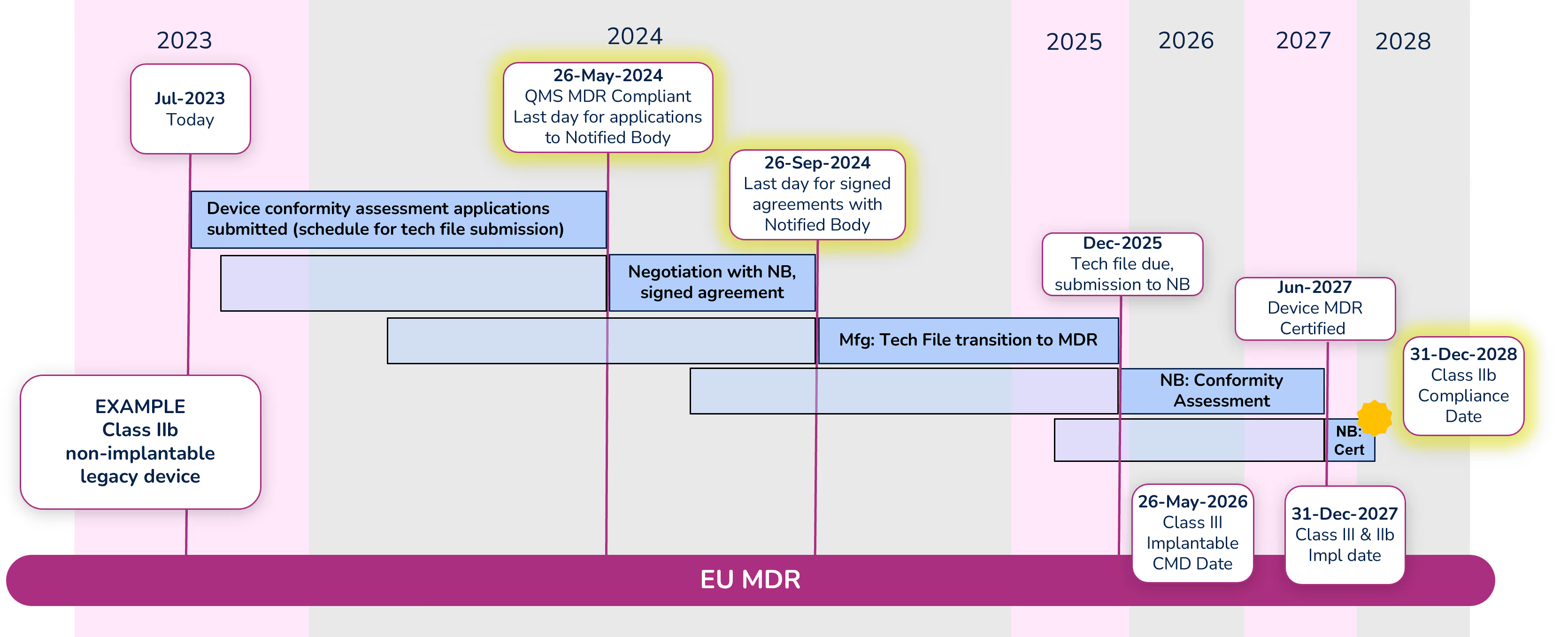
Note: Dates within the diagram for tech file submission and certification are based on your signed agreement with your Notified Body and the outcome of the conformity assessment. The dates shown are only an example.
Apply for conformity assessment - May 26, 2024
Even with the extension, a quality management system (QMS) that is compliant with MDR is required by May 26, 2024. Manufacturers must submit an application for the device conformity assessment to a Notified Body (NB) before that date as well. There are significantly fewer Notified Bodies that are certified to MDR, and due to their limited resources, manufacturers should begin working with their NB immediately if they have not already done so. Note that the device technical file does not need to be submitted with the application, but a submission schedule must be.
Sign agreement with Notified Body – September 26, 2024
Before signing an agreement with the Notified Body, expect them to counter your application with a new submission date. Manufacturers can negotiate the date with their Notified Body, but a signed agreement must be in place before September 26, 2024. While in this negotiation phase, keep in mind the MDR compliance deadline for the device (Class IIb in this example) is December 31, 2028, and work backward accounting for the various activities that must take place and their durations. It is extremely important to define a realistic schedule because not meeting that schedule will cause significant administrative complications and raise the potential risk that a device is not certified before the required deadline.
Conformity Assessment
The Notified Body will begin the conformity assessment once they receive the technical file for your device. Technical files should be submitted to the Notified Body by the date defined in your agreement (Dec 2025 in our example).
We are hearing that conformity assessments for many devices are taking 12-18 months. During that period, be prepared to answer questions and participate in conversations with your NB. In some cases, there can be significant back-and-forth between the manufacturer and the NB during the conformity assessment. Once the conformity assessment is complete (Jun 2027 in our example) it can take up to another 3-6 months for certificate issuance.
MDR extension reference documents
- Q&A Document for Regulation 2023/607 – Published by the EU Commission, this document answers some of the common questions around the extension in “plain English.”
- Regulation 2023/607 amending MDR (EU) 2017/745 and IVDR (EU) 2017/746 in regard to the transitional provisions and removal of sell-off periods for medical devices and for in vitro diagnostic medical devices.
- Notified Body Confirmation Letter template published by Team NB. This is a confirmation letter created by the manufacturer for the Notified Body to sign. The letter is not mandatory but is strongly recommended to provide objective evidence that the conditions of the extension have been met extending the validity of the CE certificate.
For more information, watch the replay of our recent "Ask Us Anything" webinar on the EU MDR Transition Period Extension.

Declarations of Conformity
What is a Declaration of Conformity?
A Declaration of Conformity (DoC) is a required self-certifying document created by the medical device manufacturer to state that a device or a series of devices complies with the conformity requirements of a particular country’s regulations. If a DoC is required in a country, specifically in the European Union, the DoC confirms that a product is in compliance with all relevant European product safety requirements. DoC is required for each product and identifies the party responsible for market authorization activities in the applicable country.
Why is a Declaration of Conformity necessary?
Declarations of Conformity require the signee to take responsibility for a product’s compliance within that country’s rules and regulations. It also allows government authorities and regulatory bodies to identify who is legally responsible for a product and its regulatory activity, such as obtaining a CE mark.
Why are Standards often listed in the Declaration of Conformity?
Governments often use industry standards to define sections of the conformity assessment for particular devices. These standards are developed by standards organizations, such as ISO and IEC. For example, the ISO 13485:2016 standard defines quality management system (QMS) requirements for medical device organizations. Typically, highly developed countries use a particular version of a standard in their regulations. A manufacturer is then required to state that they are compliant to those standards when they submit their documentation – in the form of a DoC. Drafting a European Union DoC is an important part of the CE marking process and is the final step before affixing the CE mark to your product.
Countries that Require a Declaration of Conformity
Declarations of Conformity are required in many countries, though some refer to a “Certificate” of Conformity. Countries that currently have a DoC requirement:
- Australia
- Brazil – Still in development
- China
- European Union - All countries in the EU require a DoC, but you only need to create one document
- Malaysia
- Saudi Arabia
- Singapore – Singapore will accept an EU DoC in most cases, but in certain circumstances will require a Singapore DoC
- Thailand
- United Kingdom (UK)
In the United States, the FDA’s Declaration of Conformity is built into the eSTAR program.
What is required in a Declaration of Conformity?
While the requirements vary slightly by country, a DoC should be provided on company letterhead and general requirements typically include:
- Standards related to the product that are compliant to a country’s regulations
- Product Name
- Part Number
- Physical and legal manufacturer details
- ISO Certificate Information
- Classification of the device per the country regulations and the specific rule used to classify the device
- Notified Body details
- Distributor information
- A statement regarding the regulation that the responsible party is stating compliance to
- A signature from the responsible party
Using a Regulatory Information Management (RIM) system, like Rimsys, to manage your product data and related standards will allow your regulatory team to create and control declarations of conformity and other documents. Learn more here.
An overview of 21 CFR Part 812
This document is a summary of the regulation and does include wording taken directly from the regulation itself. The original regulation should be referenced directly, however, for complete information when submitting an IDE request.
What is an investigational device exemption?
An investigational device exemption (IDE) allows a device to be used in a clinical study prior to obtaining market approval to collect safety and effectiveness data. Clinical studies are typically required to support a Premarket Authorization (PMA), but a small percentage of 510(k) applications also require clinical data when a predicate device comparison is inappropriate for the submission.
Before a clinical study is initiated, an investigational device must have an approved IDE, unless it is exempt. Devices may be exempt from IDE requirements if they are noninvasive diagnostic devices, being used for consumer preference testing unrelated to device safety or efficacy, or intended solely for veterinary use or research with laboratory animals. Refer to the full text of 21 CFR 812 for details and additional exemptions.
Part 812 – General Provisions (Subpart A)
Scope
This regulation is applicable to all clinical investigations of devices used to determine safety and effectiveness, except where exempt.
Applicability
Abbreviated Requirements
Investigations are considered automatically approved for IDEs if the device is not considered a significant risk, unless the FDA has specifically notified the sponsor otherwise. In these cases, the sponsor must still obtain IRB approval for the investigation and must comply with other requirements of Part 812, including proper labeling, record keeping, and conformed consent requirements.
Exempted investigations
IDEs are not required for devices that fall into one of the following categories:
- Devices that were in commercial distribution prior to May 28, 1976 that were used or investigated according to requirements in effect at that time. Devices that were introduced after May 28, 1976 but which have been found to be substantially equivalent to devices introduced earlier may also be exempt. This exemption is limited for Class II and III devices from the date an FDA regulation or order calls for the submission of a PMA (in the case of an unapproved Class III device) or establishes a performance standard for a Class II device.
- Diagnostic devices for which the testing is noninvasive and without significant risk, and is not used as a diagnostic procedure without confirmation through another product or procedure.
- Devices undergoing consumer preference testing, or testing of a device modification or combination of already distributed devices, if the testing is not for purposes of determining safety or efficacy and does not put subjects at risk.
- Devices solely for veterinary use.
- Devices intended for research on or with laboratory animals.
- A custom device that is not being used to determine safety or efficacy for commercial distribution.
Definitions
21 CFR Part 812.3 provides definitions for many terms, some of which are listed here.
Institution: A person, other than an individual, who engages in the conduct of research on subjects or in the delivery of medical services to individuals as a primary activity or as an adjunct to providing residential or custodial care to humans. For example, a hospital, retirement home, confinement facility, academic establishment, and device manufacturer. The term has the same meaning as “facility.”
Institutional Review Board (IRB): Any board, committee, or other group formally designated by an institution to review biomedical research involving subjects and established, operated, and functioning in conformance with part 56. The term has the same meaning as “institutional review committee.”
Investigational device: A device, including a transitional device, that is the object of an investigation.
Investigator. An individual who actually conducts a clinical investigation, i.e., under whose immediate direction the test article is administered or dispensed to, or used involving, a subject, or, in the event of an investigation conducted by a team of individuals, is the responsible leader of that team.
Monitor: When used as a noun, this term means an individual designated by a sponsor or contract research organization to oversee the progress of an investigation. The monitor may be an employee of a sponsor or a consultant to the sponsor, or an employee of or consultant to a contract research organization. Monitor, when used as a verb, means to oversee an investigation.
Significant risk device means an investigational device that:
- Is intended as an implant and presents a potential for serious risk to the health, safety, or welfare of a subject;
- Is purported or represented to be for a use in supporting or sustaining human life and presents a potential for serious risk to the health, safety, or welfare of a subject;
- Is for a use of substantial importance in diagnosing, curing, mitigating, or treating disease, or otherwise preventing impairment of human health and presents a potential for serious risk to the health, safety, or welfare of a subject; or
- Otherwise presents a potential for serious risk to the health, safety, or welfare of a subject.
Sponsor: A person who initiates, but who does not actually conduct the investigation, that is, the investigational device is administered, dispensed, or used under the immediate direction of another individual. A person other than an individual that uses one or more of its own employees to conduct an investigation that it has initiated is a sponsor, not a sponsor-investigator, and the employees are investigators.
Sponsor-investigator: An individual who both initiates and actually conducts, alone or with others, an investigation, that is, under whose immediate direction the investigational device is administered, dispensed, or used. The term does not include any person other than an individual. The obligations of a sponsor-investigator under this part include those of an investigator and those of a sponsor.
Subject: A human who participates in an investigation, either as an individual on whom or on whose specimen an investigational device is used or as a control.
Labeling of investigational devices
An investigational device or its packaging requires a label with the following information:
- Name and place of business of the manufacturer, packer, or distributor (per 801.1).
- Quantity of contents.
- Statement: “CAUTION—Investigational device. Limited by Federal (or United States) law to investigational use.”
- Any additional relevant contraindications, hazards, adverse effects, interfering substances or devices, warnings, and precautions.
- If used for animal research, a statement of “CAUTION—Device for investigational use in laboratory animals or other tests that do not involve human subjects” must be on the label.
IDE Labeling cannot have any statement that is false or misleading and cannot represent the device as safe nor effective.
Prohibition of promotion and other practices
An investigational device is intended for use only within an investigation. Therefore, until a device is approved for commercial distribution by the FDA, the sponsor or investigator (or those working on their behalf) cannot:
To continue reading this Regulatory Brief, please download the full document here.